7 Best Monitor Calibrators for 2026 (Perfect Color Accuracy)
You want perfect color accuracy by 2026—top choices include the Datacolor Spyder Monitor Calibrator for Creators, Calibrite Display Plus HL, and SpyderPro with 3D LUT support. These handle up to 12,000 nits and feature advanced profiling.
For simpler needs, try the Calibrite Display 123. All offer intuitive software, ambient light adjustment, and cross-device consistency.
Choose based on your display type, workflow, and precision needs—your ideal match is ready to unleash next-level color confidence.

Quick Overview
- Top calibrators like Datacolor SpyderPro and Calibrite Display Plus HL support up to 12,000 nits for accurate HDR display calibration.
- Advanced models offer 3D LUT export and C2PA support for consistent color from capture to output and secure content provenance.
- Built-in ambient light sensors automatically prompt recalibration when lighting changes exceed 100–200 lux or 200 K.
- Intuitive software such as Calibrite PROFILER and Datacolor’s DevicePreview Plus enables custom profiles and cross-screen previewing.
- Fast calibration in under 2 minutes with plug-and-play simplicity suits creators needing efficient, repeatable, and precise color accuracy.
| Datacolor Spyder Monitor Calibrator for Creators | 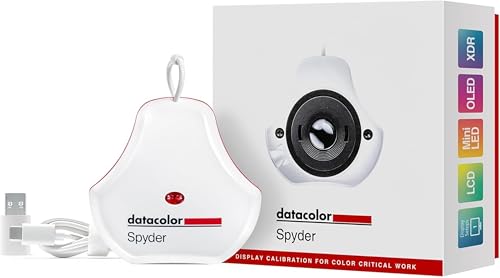 | Best Overall | Display Compatibility: OLED, mini-LED, LED, Apple Liquid Retina XDR | Calibration Type: Full monitor calibration with ambient adjustment | Software Included: Datacolor Spyder software (intuitive, pre-sets, custom) | VIEW LATEST PRICE | Read Our Analysis |
| Calibrite Display Plus HL (CCDIS3PLHL) |  | Professional Grade | Display Compatibility: LCD, mini-LED, OLED, Apple XDR | Calibration Type: Calibration and profiling | Software Included: Calibrite PROFILER software | VIEW LATEST PRICE | Read Our Analysis |
| Calibrite Display 123 Colorimeter (CCDIS123) |  | Budget-Friendly Pick | Display Compatibility: LCD, LED (implied general support) | Calibration Type: Basic color calibration | Software Included: Simplified calibration software (1-2-3 use) | VIEW LATEST PRICE | Read Our Analysis |
| Datacolor SpyderPro Monitor Calibration (C2PA 3D LUT) |  | High-End Performance | Display Compatibility: QD-OLED, OLED, Mini-LED, Apple XDR | Calibration Type: 3D LUT calibration with C2PA support | Software Included: Device Preview Plus with advanced export | VIEW LATEST PRICE | Read Our Analysis |
| Datacolor Spyder X Pro Monitor Calibrator |  | Best For Beginners | Display Compatibility: Multiple laptop and desktop monitors | Calibration Type: Single-click calibration with profiling | Software Included: Wizard-driven calibration software | VIEW LATEST PRICE | Read Our Analysis |
| Calibrite Photo Kit – Display Pro HL and Passport Photo 2 (CCHL-PP2) |  | Editor’s Choice | Display Compatibility: LCD, mini-LED, OLED, Apple XDR | Calibration Type: Advanced calibration with ICC profiles | Software Included: Calibrite Profiler and camera calibration software | VIEW LATEST PRICE | Read Our Analysis |
| Calibrite ColorChecker Classic Mini (CCC-MINI) |  | Essential Tool Kit | Display Compatibility: Cameras, monitors, lights, film (indirect via reference) | Calibration Type: Reference-based color verification (not active calibration) | Software Included: None (hardware reference only) | VIEW LATEST PRICE | Read Our Analysis |
More Details on Our Top Picks
Datacolor Spyder Monitor Calibrator for Creators
If you’re a graphic designer, photographer, or content creator who needs true color accuracy across OLED, mini-LED, and LED displays, the Datacolor Spyder Monitor Calibrator for Creators delivers professional-grade results in just 90 seconds—making it a top choice for creators who demand precision and speed. You’ll love DevicePreview™ Beta, which shows how your photos look on other screens.
Its ambient light sensor adjusts brightness based on your environment and prompts or auto-recalibrates when needed. The intuitive software offers presets for beginners and full customization for experts.
Compact at 3x3x2 inches and 5 oz, it supports Apple Liquid Retina XDR and more.- Display Compatibility:OLED, mini-LED, LED, Apple Liquid Retina XDR
- Calibration Type:Full monitor calibration with ambient adjustment
- Software Included:Datacolor Spyder software (intuitive, pre-sets, custom)
- Brightness Support (Nits):Supports high-brightness displays (up to XDR levels, unspecified)
- Connectivity:USB (implied, standard for Spyder)
- Target Users:Graphic designers, photographers, content creators
- Additional Feature:DevicePreview TM Beta
- Additional Feature:Ambient light sensor
- Additional Feature:Fast 90-second calibration
Calibrite Display Plus HL (CCDIS3PLHL)
You need extreme brightness accuracy, and the Calibrite Display Plus HL (CCDIS3PLHL) delivers—measuring up to 10,000 nits for precise calibration of high-luminance displays like Apple XDR, mini-LED, and OLED. It replaces the ColorChecker Display Plus and i1 Display Pro Plus, offering superior sensor performance.
You’ll use the included Calibrite PROFILER software to customize white point, gamma, and validate profiles. It works on Mac and Windows and supports some third-party apps.
With USB-C connectivity and a USB-A adapter, it’s easy to connect. The compact, recyclable packaging includes a travel pouch.
You’ll rely on it for video editing, pro photo work, and critical design tasks.- Display Compatibility:LCD, mini-LED, OLED, Apple XDR
- Calibration Type:Calibration and profiling
- Software Included:Calibrite PROFILER software
- Brightness Support (Nits):Up to 10,000 nits
- Connectivity:USB-C with USB-A adapter
- Target Users:Video editors, high-end image editors, designers
- Additional Feature:Measures up to 10,000 nits
- Additional Feature:Includes travel storage pouch
- Additional Feature:Uniformity Check feature
Calibrite Display 123 Colorimeter (CCDIS123)
The Calibrite Display 123 Colorimeter (CCDIS123) is perfect for anyone who values accuracy and simplicity—whether you’re editing photos, gaming, or shopping for clothes online. You’ll get true-to-life colors fast, with no complicated steps.
It supports two displays, so you can match your main and secondary screens effortlessly. Choose between Native or Photo brightness mode depending on your needs.
You keep colors consistent over time, ideal for home decorating or buying outfits online. It’s built for anyone who wants reliable results without a steep learning curve.
Just plug it in, run the software, and go—calibrating your monitor has never been this simple.- Display Compatibility:LCD, LED (implied general support)
- Calibration Type:Basic color calibration
- Software Included:Simplified calibration software (1-2-3 use)
- Brightness Support (Nits):Native or Photo brightness (no specific nit rating)
- Connectivity:USB (implied standard connection)
- Target Users:General users, gamers, home decorators
- Additional Feature:Supports two displays
- Additional Feature:Native or Photo brightness modes
- Additional Feature:Simple 1-2-3 setup
Datacolor SpyderPro Monitor Calibration (C2PA 3D LUT)
Datacolor’s SpyderPro stands out as the only calibrator that handles displays up to 12,000 nits, making it the go-to choice for pros working with ultra-bright monitors like QD-OLED, OLED, Mini-LED, and Apple XDR. You’ll leverage 3D LUT export to maintain color consistency from capture to output across devices.
It supports C2PA Content Credentials, so you can embed creator info, edits, and provenance for verifiable authenticity. Use Device Preview Plus to compare, sample, and batch-process images efficiently.
You can measure ambient light with the Datacolor LightColor Meter or other LUX-capable meters, ensuring accurate calibration in any environment.- Display Compatibility:QD-OLED, OLED, Mini-LED, Apple XDR
- Calibration Type:3D LUT calibration with C2PA support
- Software Included:Device Preview Plus with advanced export
- Brightness Support (Nits):Up to 12,000 nits
- Connectivity:USB (implied)
- Target Users:Professional videographers, color-critical workflows
- Additional Feature:3D LUT export
- Additional Feature:C2PA Content Credentials
- Additional Feature:Ambient light meter integration
Datacolor Spyder X Pro Monitor Calibrator
Start trusting your screen with the Datacolor Spyder X Pro if you’re a photographer or content creator who demands accurate, consistent color—especially when editing images across multiple displays. You’ll get precise results fast, thanks to its lens-based color engine and room-light monitoring.
Just follow the intuitive wizard and click once to calibrate—most sessions take only 1–2 minutes. You can set 12 custom targets and switch profiles automatically.
Use SpyderProof to see real improvements in color, shadows, and white balance using your own photos. It works seamlessly across laptops and desktops, giving you reliable, professional output every time—perfect if you’re new to calibration or need hassle-free precision.- Display Compatibility:Multiple laptop and desktop monitors
- Calibration Type:Single-click calibration with profiling
- Software Included:Wizard-driven calibration software
- Brightness Support (Nits):Standard to high brightness (no max specified)
- Connectivity:USB (standard Spyder X interface)
- Target Users:Photographers, first-time users
- Additional Feature:Lens-based color engine
- Additional Feature:Single-click calibration
- Additional Feature:SpyderProof visual verification
Calibrite Photo Kit – Display Pro HL and Passport Photo 2 (CCHL-PP2)
Need rock-solid color accuracy for high-dynamic-range displays up to 3,000 nits? Use the Calibrite Display Pro HL—it measures brightness precisely and delivers reliable results across LCD, mini-LED, OLED, and Apple XDR screens.
Its future-ready design handles emerging tech with ease. Pair it with the ColorChecker Passport Photo 2 to lock in accurate captures under any light, thanks to its 24-patch, gray, and white balance targets.
You’ll create custom camera profiles for better raw editing and seamless camera matching. Calibrite Profiler software lets you tweak white point, gamma, and build ICC profiles.
Works smoothly on Mac and Windows. This combo nails color from capture to edit—ideal for pros demanding precision.- Display Compatibility:LCD, mini-LED, OLED, Apple XDR
- Calibration Type:Advanced calibration with ICC profiles
- Software Included:Calibrite Profiler and camera calibration software
- Brightness Support (Nits):Up to 3,000 nits
- Connectivity:USB (implied for Display Pro HL)
- Target Users:Professional photographers, color-critical workflows
- Additional Feature:Includes ColorChecker Passport Photo 2
- Additional Feature:Custom camera profiles
- Additional Feature:Camera matching support
Calibrite ColorChecker Classic Mini (CCC-MINI)
You’ll get accurate color calibration in a compact, portable format with the Calibrite ColorChecker Classic Mini (CCC-MINI)—ideal for photographers, videographers, and print professionals who demand consistency across cameras, monitors, scanners, and lighting setups. You’ll use it to check images and output in digital and traditional photography, verifying films, lights, filters, and paper.
In graphic arts, you’ll rely on it to assess any printing or proofing process. For video and TV, it guarantees your cameras, monitors, and lights stay true.
You’ll also use it for product identification and color accuracy across devices. It’s a trusted tool for real-world color checks wherever you work.- Display Compatibility:Cameras, monitors, lights, film (indirect via reference)
- Calibration Type:Reference-based color verification (not active calibration)
- Software Included:None (hardware reference only)
- Brightness Support (Nits):Not applicable (reference card)
- Connectivity:None (passive tool)
- Target Users:Photographers, cinematographers, imaging technicians
- Additional Feature:24-patch reference target
- Additional Feature:Works for film/scanners
- Additional Feature:Cross-industry color standard
Factors to Consider When Choosing Monitor Calibrators
You’ll want to check display compatibility first—your calibrator must work with your screen type and OS. You need accurate color readings, so look for strong calibration accuracy across different brightness and color temps.
Features like intuitive software, ambient light handling, and ease of use will make your workflow smoother.
Display Compatibility
When selecting a monitor calibrator, start by confirming it supports your display’s technology—whether LCD, LED, mini‑LED, OLED, QD‑OLED, or other emissive panels—since each requires specific sensors and calibration algorithms. Check that the device measures high enough brightness, especially if you use HDR; some displays hit thousands of nits, so your calibrator must keep up.
Make sure it handles your panel’s full color gamut—like sRGB, Adobe RGB, DCI‑P3, or Rec.2020—so profiles stay accurate across all colors. If you run multiple monitors, verify the calibrator and software can store separate profiles and auto-switch when displays change.
Finally, guarantee full OS compatibility—Windows, macOS—and that the software works with your graphics pipeline, including external LUTs if you use hardware calibration. Skip any model that doesn’t fully support your setup.
Calibration Accuracy
Though often overlooked, calibration accuracy hinges on the quality of the sensor and its ability to capture true display performance. You need a calibrator with a spectrally accurate sensor—preferably a spectroradiometer or high-end colorimeter with spectral correction—to minimize metamerism and guarantee consistent results across OLED, LED, and Mini-LED displays.
Always check the device’s measurement repeatability and uncertainty specs; low delta E and stable nm-level readings mean you’ll get reliable results over time. Make sure it measures a wide luminance range, from dim SDR to 2000+ nits for HDR.
Confirm it supports 3D LUT creation or precise ICC profiling for accurate tone and gamut mapping. Also, pick one that measures ambient light—since room lighting affects perceived color—and uses that data to refine your profiles or adjust brightness automatically.
Ease of Use
What makes a calibration tool truly user-friendly? You want an intuitive, wizard-driven interface with clear presets so you can finish a standard calibration in 1–2 minutes—no advanced tweaks needed.
Pick a device that offers one-click routines, taking under 90–120 seconds, and shows visual before-and-after results so you can confirm accuracy fast. Go for calibrators that automatically measure ambient light and prompt you—or even auto-adjust—when lighting shifts.
Make sure the software lets you switch easily between saved profiles, like photo, video, or native modes, and handle multiple displays without hassle. Choose a tool with solid documentation, built-in guidance, and simple workflows.
It should offer smart presets for beginners while still giving pros access to deeper controls when needed.
Software Features
If you’re serious about color accuracy, you’ll want calibration software that gives you full control over white point and gamma targets, letting you align displays with specific print or video standards instead of generic presets. You should pick tools that generate ICC or 3D LUT profiles and let you export them for use across systems and workflows.
Make sure the software includes profile validation and uniformity checks so you can verify display accuracy and consistency. Opt for apps that support both beginner-friendly modes and advanced features like batch processing, side-by-side proofing, and profile history for repeatable results.
These options save time and improve precision, especially if you manage multiple screens. You’ll also benefit from software that supports customizable workflows and keeps detailed logs.
Strong software doesn’t just calibrate—it empowers you to trust and maintain your display’s performance over time.
Ambient Light Handling
How often do you check the lighting in your workspace when calibrating your monitor? You should measure ambient light in lux and color temperature—changes over 100–200 lux or 200 K demand recalibration.
Pick a calibrator with an ambient light sensor or manual input so you can adjust display luminance (aim for 80–120 cd/m² in dim rooms) and contrast accordingly. Use automatic or prompt-driven recalibration to catch gradual shifts that skew color and tone.
Don’t assume equal lux means equal viewing conditions; different color casts affect judgment, so rely on measured CCT and spectral data when possible. For print matching or multi-display setups, log lux and CCT to make repeatable, consistent results.
Your calibration’s accuracy depends on controlled, documented lighting—don’t let unnoticed ambient changes undermine your workflow.
Frequently Asked Questions
How Often Should I Recalibrate My Monitor?
You should recalibrate your monitor every 2 to 4 weeks for best results. You’ll notice color shifts over time, so regular checks keep your display accurate.
Don’t wait until things look off—stay consistent to maintain quality in your work.
Can I Use a Calibrator on Multiple Monitors?
You can use one calibrator across multiple monitors—same device, different screens, yet each reveals color truth uniquely. You’re not just matching hardware; you’re aligning perception, ensuring every glance shows the world as it’s meant to be seen.
Are Expensive Calibrators Worth the Investment?
Yes, they’re worth it if you demand precision. You’ll save time, guarantee consistency across devices, and get reliable results.
Cheaper tools cut corners—your work deserves better. Invest once, trust every color you see.
Do Calibrators Work With OLED Displays?
Yes, they do. You plug in the calibrator, and it glows faintly—first red, then green, then blue—measuring every shift, every shadow, until your OLED renders color so true, it feels like reality itself just got upgraded.
You won’t look back.
Can I Calibrate a Laptop Screen Effectively?
You can calibrate a laptop screen effectively, but results vary. Built-in displays often have limits, so use a quality calibrator, avoid extreme adjustments, and recalibrate monthly for best color accuracy on your screen.
Conclusion
You’ve seen the best—now it’s your move. Picking the right calibrator is like choosing the perfect pair of glasses: suddenly, everything’s sharp and true.
Whether you’re editing photos or designing masterpieces, these tools make sure what you see is what you get. Don’t guess colors; know them.
Grab one, calibrate, and let your screen finally show the world as it should be—crisp, clear, and dead-on accurate.