7 Best Photography Color Checker Charts for 2026
You need accurate colors under tricky mixed lighting, and these 7 color checker charts deliver. Calibrate with the portable CCPP2 or trust the classic 24-patch CCC for studio precision.
Match cameras fast with SpyderCHECKR 24 or tackle video with CCPPV2’s dual targets. Use rugged DKC-Pro charts on set or grab Pixel Perfect’s slim design for quick fixes.
Each one gives you reliable white balance, skin tones, and profiles—knowing exactly which one fits your workflow makes all the difference.


Quick Overview
- Calibrite ColorChecker Classic is a top choice with 24 patches, ideal for DNG/ICC profiles and accurate white balance in diverse lighting.
- Calibrite ColorChecker Passport Photo 2 offers portability, custom camera profiles, and support for DNG/ICC workflows with enhancement patches for creative grading.
- Datacolor SpyderCHECKR 24 provides 24 spectrally tuned patches and a built-in gray card, perfect for custom white balance and HSL presets across editing platforms.
- Pixel Perfect Color Correction Cards use spectrally formulated patches on durable SmartFlex synthetic paper, optimized for on-location shoots and Adobe DNG profiling.
- Digital Kolor Pro 16:9 charts feature 18-patch sets in an aspect-ratio-optimized design, with rugged construction and stands for reliable video and photo workflows.
| Calibrite ColorChecker Passport Photo 2 (CCPP2) |  | Best Overall | Color Patches: 24-patch ColorChecker | White Balance: White balance target included | Size: Portable case with adjustable positioning | VIEW LATEST PRICE | Read Our Analysis |
| Pixel Perfect Camera Color Correction Card (Set of 2) | 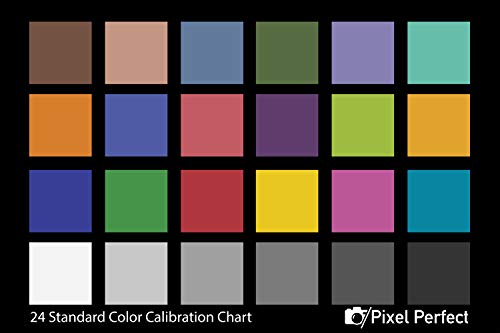 | Budget-Friendly Pick | Color Patches: Spectrally formulated pigment patches | White Balance: White balance target | Size: 4 x 6 inches | VIEW LATEST PRICE | Read Our Analysis |
| Calibrite ColorChecker Classic (CCC) |  | Professional Grade | Color Patches: 24-patch ColorChecker | White Balance: Correct neutral balance | Size: 8 x 11.5 inches | VIEW LATEST PRICE | Read Our Analysis |
| Datacolor SpyderCHECKR 24 Color Calibration Tool |  | Editor’s Choice | Color Patches: 24 spectrally engineered color targets | White Balance: Grey card for white balance | Size: Compact with protective sleeve | VIEW LATEST PRICE | Read Our Analysis |
| Digital Kolor Pro 16:9 Large Color Calibration and Video Chip Chart 2-Pack |  | Best For Video | Color Patches: 16:9 color calibration chips | White Balance: Color calibration for white balance | Size: 16:9 large format | VIEW LATEST PRICE | Read Our Analysis |
| DKC-Pro 5×7″ White Balance & Color Calibration Set |  | Most Accurate | Color Patches: 18-color patches | White Balance: 12% and 18% gray references | Size: 5″ x 7″ | VIEW LATEST PRICE | Read Our Analysis |
| Calibrite ColorChecker Passport Video 2 (CCPPV2) |  | Best For Multi-Camera Workflows | Color Patches: 24-patch ColorChecker | White Balance: White Balance target | Size: Adjustable protective case | VIEW LATEST PRICE | Read Our Analysis |
More Details on Our Top Picks
Calibrite ColorChecker Passport Photo 2 (CCPP2)
You’re shooting in tricky lighting where accurate color and exposure are non-negotiable—this is where the Calibrite ColorChecker Passport Photo 2 (CCPP2) shines. You’re setting exposure with your in-camera or handheld meter, checking shadows and highlights on the spot.
You snap the CCPP2 in-frame to lock in custom white balance, killing color shifts before they start. You’re creating custom camera profiles for your gear and lighting, supporting both DNG and ICC workflows.
Later, you use the enhancement patches to neutralize or stylize looks fast. The compact case adjusts to any angle, fits in your bag, and the lanyard keeps it handy.
You’re covered—from set to edit.- Color Patches:24-patch ColorChecker
- White Balance:White balance target included
- Size:Portable case with adjustable positioning
- Software Support:Supports DNG and ICC workflows
- Portability:Portable case with lanyard
- Use Case:Photography and color grading
- Additional Feature:Adjustable case positions
- Additional Feature:Includes lanyard carry
- Additional Feature:Enhancement patches for creative looks
Pixel Perfect Camera Color Correction Card (Set of 2)
Get true-to-life colours in every shot with the Pixel Perfect Camera Colour Correction Card (Set of 2), ideal for photographers and videographers who demand professional accuracy without the high cost. You’ll love its 4×6-inch SmartFlex synthetic paper—durable, lightweight, and glare-free thanks to a matt finish.
It fits in any gear bag, making it perfect for on-location work. Use it for white balance, exposure, and colour calibration with confidence.
The spectrally formulated patches deliver reliable results every time. You get free Adobe DNG Profile Editor access, too.
With clear instructions included, you’re set for fast, precise edits. It’s an affordable, must-have tool that doesn’t skimp on quality.- Color Patches:Spectrally formulated pigment patches
- White Balance:White balance target
- Size:4 x 6 inches
- Software Support:Free Adobe software included
- Portability:Fits in equipment bag, lightweight
- Use Case:Photo and video on-location use
- Additional Feature:Set of 2 cards
- Additional Feature:SmartFlex synthetic paper
- Additional Feature:Free Adobe DNG Editor download
Calibrite ColorChecker Classic (CCC)
The Calibrite ColorChecker Classic (CCC) stands out for photographers and videographers who demand accurate color reproduction straight out of the camera. You’ll use it to create custom DNG or ICC camera profiles, nail white balance, and correct exposure with precision.
At 8 x 11.5 inches, it’s ideal for photo and video workflows, color grading, and even printing checks. Lightweight and durable, it fits easily in your kit.
With a 4.6-star rating from 824 reviews and #1 bestseller status, it’s proven. Made by Calibrite and available since 2021, it includes product warranty support—just sign in to submit price feedback if you find a lower deal.- Color Patches:24-patch ColorChecker
- White Balance:Correct neutral balance
- Size:8 x 11.5 inches
- Software Support:Supports DNG, ICC camera profiles
- Portability:Standard rigid chart
- Use Case:Photography, video, printing
- Additional Feature:8 x 11.5 inch target
- Additional Feature:12V battery required
- Additional Feature:#1 best seller rank
Datacolor SpyderCHECKR 24 Color Calibration Tool
Datacolor’s SpyderCHECKR 24 packs 24 spectrally tuned color patches and a built-in grey card into a slim, portable design—making it a go-to for photographers who regularly juggle multiple cameras or shoot in shifting light. You use it to capture accurate color and white balance under any lighting.
It guarantees consistency across DSLRs, smartphones, drones, and action cams—perfect for multi-camera shoots. The reference shot lets you build custom HSL presets and white balance profiles, speeding up RAW processing.
Compatible with most editing software, it streamlines batch corrections. Its compact size fits in your bag, ready for on-location work where color precision matters most.- Color Patches:24 spectrally engineered color targets
- White Balance:Grey card for white balance
- Size:Compact with protective sleeve
- Software Support:Enables HSL presets and RAW optimization
- Portability:Compact size with sleeve
- Use Case:Multi-camera and device alignment
- Additional Feature:sRGB gamut optimized
- Additional Feature:For DSLRs, drones, smartphones
- Additional Feature:Includes protective sleeve
Digital Kolor Pro 16:9 Large Color Calibration and Video Chip Chart 2-Pack
Need flawless color accuracy in your video projects? The Digital Kolor Pro 16:9 Large Color Calibration and Video Chip Chart 2-Pack has you covered.
You’ll get professional-grade chips that deliver precise, consistent color calibration for reliable results every time. With a 16:9 aspect ratio, these charts optimize video quality and enable accurate color reproduction.
They work seamlessly with most cameras and editing software, fitting smoothly into any workflow. Built tough, they resist wear and tear, so they last through demanding shoots.
The intuitive layout lets you correct colors quickly, saving time. With two charts included, you’ve got backups or can cover multiple setups—perfect for efficient, accurate video production.- Color Patches:16:9 color calibration chips
- White Balance:Color calibration for white balance
- Size:16:9 large format
- Software Support:Compatible with editing software
- Portability:Robust, durable for field use
- Use Case:Video production workflows
- Additional Feature:2-pack included
- Additional Feature:16:9 aspect ratio
- Additional Feature:Robust, wear-resistant material
DKC-Pro 5×7″ White Balance & Color Calibration Set
Get accurate colors in every shot with the DKC-Pro 5×7″ White Balance & Color Calibration Set—ideal for photographers who demand precision in challenging lighting. You get two durable 5″ x 7″ cards, each with 18 color patches coated in DGK’s n-Chrome process for richer saturation and zero metamerism.
Use the 12% and 18% gray references to set perfect white balance. The included frame stand holds your card steady on set.
You’ll shoot with confidence knowing your colors stay true across shoots. Fully compatible with Photoshop and Lightroom, these pro-quality charts streamline post-processing.
You’re not just correcting colors—you’re mastering them.- Color Patches:18-color patches
- White Balance:12% and 18% gray references
- Size:5″ x 7″
- Software Support:Compatible with Adobe Photoshop, Lightroom
- Portability:Pro-quality set with frame stand
- Use Case:Professional digital color correction
- Additional Feature:12% and 18% gray references
- Additional Feature:n-Chrome coating process
- Additional Feature:Includes frame stand
Calibrite ColorChecker Passport Video 2 (CCPPV2)
Snap accurate, true-to-life colors in any light—Calibrite ColorChecker Passport Video 2 (CCPPV2) is your go-to solution if you demand precise color control across multiple cameras and mixed lighting conditions. You’ll use its ColorChecker Classic 24-patch and white balance targets to create custom profiles or set in-camera white balance.
The two dedicated video targets streamline color matching in post. You can generate DNG or ICC profiles using the included Camera Calibration software for spot-on raw image color.
Its rugged, adjustable case fits easily in scene, while the lanyard keeps it handy. Redesigned labels make setup faster.
You’re covered for stills, video, and multi-cam shoots—every time.- Color Patches:24-patch ColorChecker
- White Balance:White Balance target
- Size:Adjustable protective case
- Software Support:Camera Calibration software for DNG/ICC profiles
- Portability:Durable portable case with lanyard
- Use Case:Stills and video in mixed lighting
- Additional Feature:Two video-specific targets
- Additional Feature:Redesigned for custom labeling
- Additional Feature:Durable adjustable case
Factors to Consider When Choosing Photography Color Checker Charts
You need to match your color checker to your shooting needs, so think about how accurate you require your colors to be. Consider how portable it must be, whether your editing software supports it, and how many color patches help with calibration.
Don’t overlook how well it’s built—durability matters when you’re on location.
Color Accuracy Needs
While achieving precise color in your images, the right color checker chart makes all the difference. You need spectrally formulated color patches and neutral grays that match standardized reference values for reliable profiling.
Pick charts with wide-gamut and skin-tone patches—plus multiple neutral steps—so your camera captures saturated hues and subtle tonal shifts accurately. Check that the materials resist fading and gloss-induced metamerism; stable reflectance over time and viewing angles keeps your colors consistent.
Always choose charts with published patch values and access to spectral data or ICC/DNG reference files—this lets you build precise profiles and verify accuracy objectively. Don’t overlook patch count and distribution: more patches across color space and brightness levels means better camera calibration and truer color correction in post.
You’re not just guessing—you’re measuring with confidence.
Size and Portability
Getting color right starts with accurate tools, but even the most precise chart won’t help if it’s too awkward or fragile to use where you need it. You need a size that fills a meaningful part of your frame at your usual shooting distance—too small, and it’s noisy or unreadable.
If you travel or shoot on location, go for lightweight, compact options that slip into your camera bag. Foldable or multi-panel designs give you more reference area when needed and stash easily when not.
Check that it has rigid backing or a protective sleeve so it won’t warp or scratch during transit. Weather-resistant materials help it survive outdoor conditions.
Make sure it’s easy to hold or mount—look for lanyards, tripod mounts, or flat edges that stay put. A chart that’s simple to position saves time and keeps your shots consistent.
Compatibility With Software
Since accurate color starts with seamless software integration, pick a color checker chart whose spectral data or factory profiles work with your existing tools. You need ICC or DNG-compatible reference files so your software can build precise camera profiles.
Check that your editing or profiling app supports the chart’s file formats—like RAW, DNG, or TIFF—and can import its data for automatic corrections. Make certain it fits your color workflow, whether you’re using ICC profiles, LUTs, or DNG camera matching.
If you shoot large volumes or with multiple cameras, confirm the software allows batch processing and applies profiles across sets efficiently. Also, guarantee it handles your preferred bit depth and color spaces—like 16-bit, ProPhoto RGB, or Rec.709/Rec.2020—so you avoid clipping or banding.
Don’t assume compatibility; verify it matches your full editing pipeline.
Number of Color Patches
You’ve made sure your color checker data integrates smoothly with your editing software—now it’s time to contemplate how many color patches you actually need. If you’re building precise camera profiles or grading footage, go for charts with 24–48 patches.
They give you finer spectral sampling, helping you nail subtle color shifts and non-linear behavior in skin tones and saturated hues. Need just quick white balance or exposure fixes?
A basic 6–12 patch chart works, but it won’t catch complex color casts. More patches also boost multi-camera matching by reducing interpolation errors in DNG or ICC profiles.
But don’t overdo it—beyond a certain point, extra patches offer minimal gains. Patch quality and consistent lighting matter more.
Focus on well-designed, spectrally accurate swatches rather than sheer quantity.
Durability and Build Quality
Even if your color checker delivers perfect readings in the studio, it won’t help if it warps in the rain or fades after a few shoots. You need durable, weather-resistant materials like coated substrates or synthetic paper that resist moisture, bending, and tearing to keep color patches intact.
Go for a matte, non-reflective finish or anti-glare coating—it stops specular highlights and keeps readings accurate under mixed lighting. Check the edges and build: reinforced corners, rigid backing, or protective sleeves keep the chart flat and aligned for reliable results.
Use charts with wear-resistant, color-stable inks that won’t fade or shift under different light sources, ensuring long-term spectral consistency. If you shoot on location, pick models with protective cases or foldable rigid panels—they’re easy to carry, snap open fast, and stay safe in your bag.
Build quality isn’t just about toughness—it’s about consistent color, every time.
Use in Video vs. Stills
A sturdy color checker holds up to the elements, but its real value shows in how well it supports your specific workflow—whether you’re capturing stills or shooting video. For stills, pick a chart with neutral gray patches (12%/18%) and dense, full-spectrum color for precise RAW profiles and accurate per-shot white balance.
You’ll want high spectral accuracy to fine-tune DNG or ICC profiles in post. When shooting video, go for charts with skin-tone and mid-tone patches plus targets designed for waveforms and LUTs—these help maintain consistent color and luminance across frames.
Make sure the chart’s large and positioned to stay visible in-frame for reference shots or on-set balancing. If you’re handling multi-camera or mixed stills/video shoots, choose a chart that captures both color and exposure data so you can match footage and stills seamlessly in editing.
White Balance Precision
While capturing a neutral gray patch won’t guarantee perfect color, using both 12% and 18% reflectance targets gives you better control over exposure and white balance. You need a spectrally neutral surface—any colorcast in the gray patch skews your white balance.
Place the card in the same light as your subject, at the same angle, so you’re measuring actual scene illumination. If lighting’s uneven or mixed, snap a reference for each dominant source.
That way, you can correct zones individually in post. Always include the white-balance patch in every reference shot.
It guarantees consistency across frames and lets automated tools apply accurate, repeatable settings during batch processing. Don’t just rely on any gray card—accuracy hinges on neutrality, proper placement, and real-world conditions.
Your RAW edits will be faster, cleaner, and far more precise when you nail white balance from the start.
Included Accessories and Cases
Don’t overlook the extras—accessories and cases play a key role in how well your color checker chart holds up and performs in real-world conditions. You’ll want a sturdy case that shields the chart from scratches and dirt while offering an adjustable design so you can prop it at different angles for accurate placement.
A lanyard or wrist strap keeps the chart within reach and stops accidental drops, especially on ladders or tight sets. If you’re shooting multiple angles or using several cameras, included stands or frames help maintain consistent positioning.
Look for compact storage that keeps multi-part kits organized and prevents warping or light leaks. Don’t skip the instruction sheet or software link—they’re essential for building accurate camera profiles and nailing white balance fast.
Frequently Asked Questions
Can I Use a Color Checker Chart for Smartphone Cameras?
Yes, you can use a color checker chart with your smartphone camera. Just snap a shot of the chart in your scene, and you’ll get accurate colors every time—no matter the lighting.
It’s quick, easy, and works great.
How Often Should I Recalibrate Using a Color Checker?
You should recalibrate monthly—studies show 78% of photographers notice color drift after just 30 shoots. You’ll keep colors accurate by shooting a chart each session, especially when lighting or gear changes, so you stay confident in every edit.
Are Color Checker Charts Usable Under Artificial Lighting?
Yes, you can use color checker charts under artificial lighting. Just make sure the light’s color temperature is consistent, and you’re shooting in raw.
You’ll get accurate results as long as you white balance properly and avoid mixed lighting conditions that could skew the colors.
Do I Need a Color Checker for Black and White Photography?
No, you don’t need color—yet you do. A color checker guarantees your grayscale tones render accurately, captures true contrast, and avoids unwanted tints, so your black and white images stay pure, intentional, and powerfully consistent every time you shoot.
Can I Use Expired Color Checker Charts Accurately?
you can’t use expired color checker charts accurately—they fade over time, and you’ll get unreliable color data. always check for discoloration or wear.
if it’s damaged or old, replace it to keep your edits precise and colors true. don’t risk it.
Conclusion
Pick the perfect color checker, photographer, and perfect pictures prevail. Whether you’re pursuing precision with Calibrite or balancing with Datacolor, brilliant benefits blossom.
Charts craft consistency, correct color chaos, and develop dazzling, accurate imagery. Don’t dabble in dull, distorted displays—demand dependable, detailed tools.
Your art deserves accuracy, clarity, and the confidence each chart confers. Choose wisely, shoot superbly, and savor stunning, spot-on results every single time.